Project Zero: How Real Teams Start Codebases
What happens before the first line of code, after `mkdir` and `main.go`. How a team sets up, plans and tracks a new application.
Starting a project can look like one step. You create a folder, open your editor, and start writing code.
On a team, writing code is usually the last part of starting a project. Setting up the repository, planning the work and tracking it come first.
Once that setup is in place, branches, task boards and a tidy history stop feeling like extra work. They make the team faster.
The infrastructure phase
Before anyone writes a single if statement, the project needs a few files that set its rules.
Version control comes first. It starts with git init, which creates the repository, and a .gitignore file. The ignore file lists files that Git should never save. The repository belongs to the whole team, and teammates use different operating systems and editors. Each of those creates its own files in the project folder, and those files don't belong in the shared history.

| Pattern | Origin | Why it must be ignored |
|---|---|---|
*.swp | Vim and Neovim | Swap files the editor keeps for crash recovery while a file is open. They are temporary and specific to one person. |
.DS_Store | macOS | Hidden files that store how a folder is displayed. Without this line, they get committed as soon as a Mac user opens the folder. |
.vscode/ and .idea/ | VS Code and JetBrains | Personal editor settings. Committing them would overwrite your teammates' own settings. |
Then the module. A command such as go mod init, npm init or cargo new creates the file where the project's name and its dependencies, the outside libraries it uses, are recorded. From then on, the package manager knows exactly which versions the project needs.
Then a standard folder layout. Most team codebases keep the program's starting point separate from the rest of its code. A common layout looks like this.
project-root/
├── .gitignore
├── go.mod (or package.json)
├── README.md
├── cmd/
│   └── app/
│       └── main.go         ← Entry point
├── internal/               ← Private application logic
└── docs/                   ← Project documentation
The initial commit, and Conventional Commits
Commit that empty skeleton right away, as its own commit. Don't mix the project setup with the first feature.
Many teams write commit messages following a standard called Conventional Commits.
Here is the problem it solves. A repository can have hundreds of commits. If their messages say "updated stuff" and "fixed bug", nobody can tell what changed without reading every one. Conventional Commits starts every message with a fixed prefix that says what kind of change it is. Anyone reading the history can see at a glance what happened, and tools can build release notes from the messages automatically.
| Prefix | Purpose | Example |
|---|---|---|
chore: | Setup, maintenance and dependency updates that don't change what the app does. | chore: initial project structure |
feat: | A new feature. | feat: add user authentication |
fix: | A bug fix. | fix: prevent app crash on empty input |
docs: | Documentation only. | docs: add API installation guide |
refactor: | Code rewritten to be cleaner or faster, without changing what it does. | refactor: simplify database query |
test: | New tests, or fixes to existing tests. | test: add unit tests for routing |
Using this system, the first commit is a chore: commit with the project structure and settings. It gives everyone the same clean starting point to branch from.
Planning: issues and the Kanban board
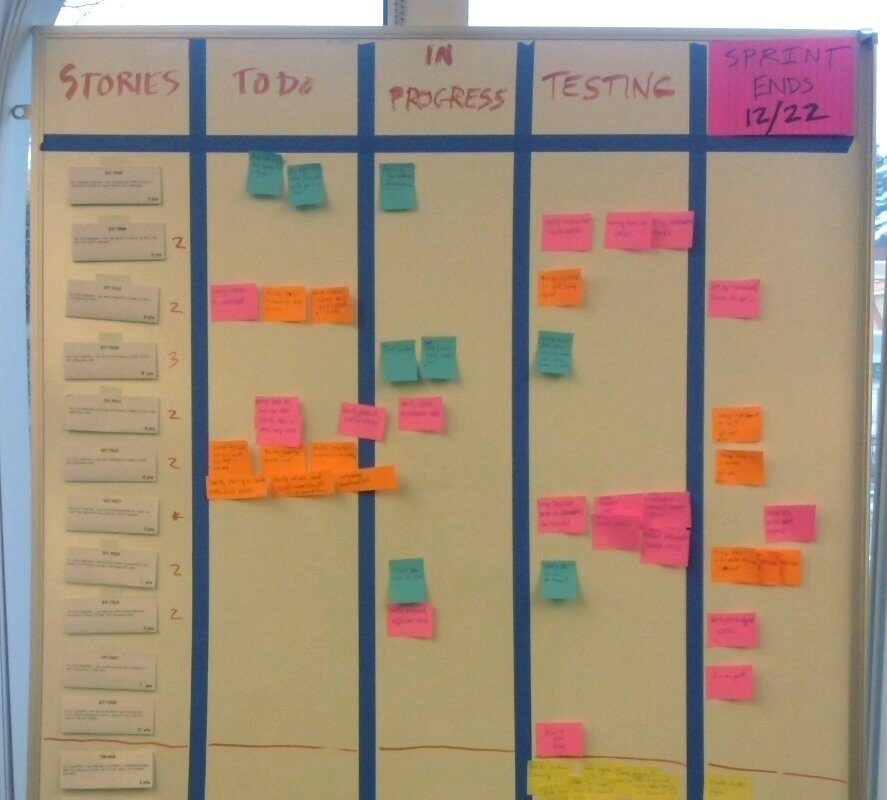
An empty repository doesn't tell a team what to do next. So the team splits the application into small tasks. Each task is written down as an issue in an issue tracker, such as GitHub Issues, and the issues go on a Kanban board. A Kanban board is a board with one column for each stage of work, and each task moves from left to right as it progresses.
| Column | Purpose |
|---|---|
| To Do | Tasks that are fully described and ready to start. |
| In Progress | Tasks someone is working on right now. |
| Review | Code that is written and waiting for a teammate to review it. |
| Done | Merged into the main codebase. |
The design document
The design is written down before the code. The first task to move into In Progress is usually the design document. Some teams call it an RFC, which stands for Request for Comments.
Before anyone creates a database table or writes the main logic, the document describes the plan: how the parts of the system fit together, what data it stores, and what the user does step by step. The team reads it and comments, and agrees on the design before anyone builds it. Changing a document is much cheaper than changing finished code.
Workflow: feature branches and test first development
Once the design is agreed, development starts. Nobody commits directly to the main branch.
- Branch. Make a separate branch for your work, for example with
git checkout -b feature/user-auth. Your changes stay there until they are ready. - Write the test first. In Test-Driven Development, you first write a test that describes what the code should do, and then you write the code. Writing the test first makes you use your own API (Application Programming Interface) the way a caller would, which tends to make the functions easier to use.
- Implement. Write the code until the test passes.
- Merge. Open a pull request, which asks the team to review your branch and merge it into main.
The Bottom Line
I write my tools in Neovim on Arch, and when I'm working alone it's tempting to start coding right away.
But this workflow, with design documents before code, a complete ignore file, conventional commits and tracked issues, is what lets other people work in the codebase with me.
Plan, branch, test, implement, merge. Following those steps makes it much easier to work with other engineers, and with yourself six months later.
Check yourself
3 questions · nothing is savedWho wrote this
Author profile and background

Takumi Yamada
· Backend EngineerBackend engineer building services, databases, Linux tooling, and NEGEN SYSTEMS. Writing about low-level mechanics, distributed systems, and real-world security.
- Written
- Apr 19, 2026
- Length
- 1,038 words · 5 min
- Built
- …
- Served by
- …
- Delivered
- …
- Over the wire
- …
- Go's share
- …
Model-View-Update: The Loop That Makes Rust TUIs Sane
Every UI I wrote badly had the same problem: one part of the screen changing another part's data. MVU prevents that with one rule, and in Rust that rule is exactly what the borrow checker already asks for.
How a Computer Works: From Sand to Software
Transistor, gate, adder, clock, memory, program: the six layers between electricity and the software you run.
How a CPU Actually Runs Your Code
Your C or Go program is just numbers in memory, and the CPU reads them one instruction at a time. Here's the loop that does it.