Smart Homes Are a Security Nightmare (If You're Not Careful)
Every smart bulb is a small computer on your network. Here's how these devices get taken over, and the checklist that keeps them contained.
A smart bulb looks like a light.
On your network, it's a small computer. It has Wi-Fi, its own network software, firmware (the software built into the device) written by someone else, and a connection to a server you don't control that stays open all the time.
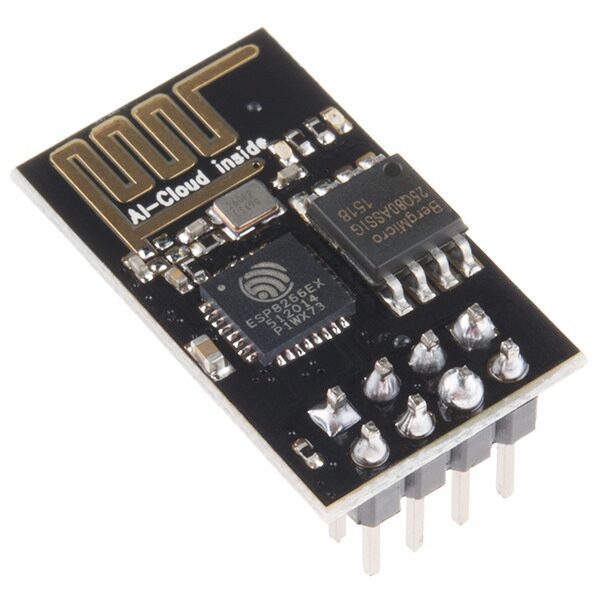
Now add every smart plug, camera, doorbell, speaker, robot vacuum and thermostat in a modern home. You have many small computers that rarely get security fixes, inside your firewall, on the same network as your laptop. The firewall protects you from the outside, but these devices are already inside.
The threat model, in one diagram
A threat model is a description of what could go wrong and who could cause it. Here is the one for a typical home.
Your laptop gets security updates every week. Your smart plug got its last firmware update in the factory, and the company that made it may not exist next year.
Even so, by default they share the same network, and nothing stops the plug from connecting to the laptop.
How smart devices actually get owned
Default passwords. In 2016, a piece of malware called Mirai took over hundreds of thousands of cameras and routers. It used them as a botnet, a large group of hijacked devices controlled together, and launched some of the largest attacks ever recorded, which flooded websites with traffic until they stopped working. Mirai didn't need a clever trick. It tried a list of about sixty factory passwords, and that was enough.
Firmware that never gets fixed. When a security hole is found in a popular Wi-Fi chip, your laptop's maker sends out a fix within days. For a smart plug from an unknown brand, the fix may never be written. Even when it is, most devices never install it, because nothing tells the owner that an update exists.
The cloud dependency. Most consumer smart devices don't really work inside your home. They work through the maker's servers, often called the cloud. Your app talks to a server in the maker's data centre, and that server talks back into your house through a connection the device keeps open.
That design has three results. The maker, and anyone who breaks into the maker's systems, has a permanent way into your network. Data about how you use the devices is stored on their servers. And if the company shuts down, your devices can stop working completely.
Moving sideways. The device itself is rarely what the attacker wants. It's the way in. A hacked bulb on the same network as everything else can search for your NAS (Network Attached Storage), your laptop's open ports, and your printer's old firmware. Security people call this lateral movement. The attacker wants what the bulb can reach, not the bulb.
The sensors themselves. Cameras, microphones, motion sensors and apps that track location are built to observe. A hacked camera account, or a badly protected remote viewing feature, lets a stranger watch your home. Even when they work as intended, many devices send the maker data about when you are home, when you speak and what you watch.
The containment checklist
I don't think you have to choose between convenience and safety. You have to keep the devices contained, which means limiting what each one can reach. Here are the steps, ordered from the least effort for the most benefit.
| # | Measure | Why it works |
|---|---|---|
| 1 | Change every default password | Stops Mirai-style attacks completely |
| 2 | Put IoT on a separate network | The bulb reaches the internet but not your laptop |
| 3 | Buy from vendors with an update track record | Firmware fixes matter more than the device's features |
| 4 | Turn off features you don't use | Every feature is one more way in |
| 5 | Prefer local first control | Devices that work without the cloud can be cut off from the internet |
| 6 | Watch the network | You can't defend what you can't see |
IoT, short for Internet of Things, is the general name for these connected devices.
Number 2 is the most important one. With a guest network, or a VLAN (a virtual LAN, which splits one physical network into separate ones), a hacked plug can no longer reach the rest of the house. It can only reach the internet. Most home routers can already do this, with their guest Wi-Fi option.
Number 5 is about how the system is designed. Protocols such as Zigbee and Z-Wave don't use IP (Internet Protocol) at all. The devices talk to a local hub by radio, and only the hub, which you control, is on your network. With Home Assistant, an open-source home control system, you can run a whole house without letting a single device reach the internet. The cloud becomes optional instead of required.
The mindset
Treat every smart device the way a system administrator treats an unknown server.
It's a computer, not an appliance. It runs code, code has bugs, and bugs get exploited.
Assume it's unsafe until it's contained. Separate it first, and trust it later.
The maker's goals aren't yours. Makers want easy setup, so things are open by default. They want data, so data collection is on by default. You can change both defaults, but only if you do it yourself.
The Bottom Line
I built my own security tools for my Arch Linux computers, because I got tired of not knowing what my own machines were doing: which programs use the camera and microphone, which files change, and what connects to the network.
A smart home multiplies that problem by twenty, and you can't install anything on the devices to check them. When you can't inspect a device, containing it is the only plan that works: separate networks, local hubs, and blocking everything that isn't needed.
Every smart device is a computer that rarely gets fixed, controlled by its maker, inside your firewall. With that in mind, smart home security becomes a checklist you can follow.
Check yourself
3 questions · nothing is savedWho wrote this
Author profile and background

Takumi Yamada
· Backend EngineerBackend engineer building services, databases, Linux tooling, and NEGEN SYSTEMS. Writing about low-level mechanics, distributed systems, and real-world security.
- Written
- Apr 25, 2026
- Length
- 1,022 words · 5 min
- Built
- …
- Served by
- …
- Delivered
- …
- Over the wire
- …
- Go's share
- …
C++ 101: The Language That Trusts You Completely
C++ gives you control over every byte of memory, and its modern features do most of the cleanup for you. Values, references, RAII, classes, templates and the standard library, with the reason behind each one.
How a VPN Actually Works
A VPN puts each of your packets inside an encrypted envelope and gives it a new return address. Here's the tunnel, the encryption, and what a VPN does and doesn't protect.
HTTP/2 and HTTP/3: Same Requests, Different Wire
A GET request still means the same thing. What changed twice is how it travels: HTTP/2 put every request on one TCP connection, and HTTP/3 moved everything onto QUIC to fix the one problem HTTP/2 couldn't.
Eduroam on Linux: Why One Wi-Fi Network Is So Hard to Join
Eduroam isn't a Wi-Fi password, it's a personal login that works across thousands of universities. Here's how it works, why Linux has trouble with it, and the settings that work.