The Cyberattacks You'll Actually Meet in Your Lifetime
The attacks that will actually reach you aren't the ones in films. They are phishing, reused passwords, infostealers, phone scams and SIM swaps. Here's how each one works, how to spot it while it's happening, and the short list of habits that stops nearly all of them.
Films have shaped our idea of a cyberattack: someone in a hoodie, green text on a black screen, and a line about "breaking through the firewall". I think that picture is the main reason many of us aren't prepared.
Real attacks in daily life are much more ordinary, and they work much better. An email that looks like it's from your bank. A password you reused in 2019. A phone call from "Microsoft support". You will meet several of these in your life, and you have probably met some already.
The important part is that most of them don't attack your computer. They attack you. That's good news, because it means you can stop them by recognizing the pattern while it's happening.
Below is the list, roughly in order of how likely each attack is to reach you. For each one, I explain how it works, how to spot it, and how to protect yourself.
1. Phishing: the attack you will meet this week
How it works. An attacker sends a message pretending to be someone you trust: your bank, PayPal, the post office or your boss. The message has a link to a fake login page. You type your password into their copy of the page, and now they have it.
That's the whole attack. No hacking tool is involved, and no firewall is broken. You gave the password away because the page looked real.
There are several versions, named after how the message arrives. Phishing arrives by email. Smishing arrives by SMS (Short Message Service) text message, often about a parcel that couldn't be delivered and a small fee to pay. Vishing is a voice call. Quishing uses QR (Quick Response) codes stuck on parking meters and posters. Attackers like it because your phone doesn't show you the full web address, the URL (Uniform Resource Locator), before opening it. Spear phishing is aimed at you personally, and mentions your real colleagues or your real orders. It works much better than the mass version.
How to spot it. Urgency, plus a link, plus a login. "Your account will be suspended in 24 hours." "Your storage is 100% full." "Confirm this payment now." Real companies almost never combine a deadline with a link you must click right away. Scammers always do, because under time pressure, everyone checks less carefully.
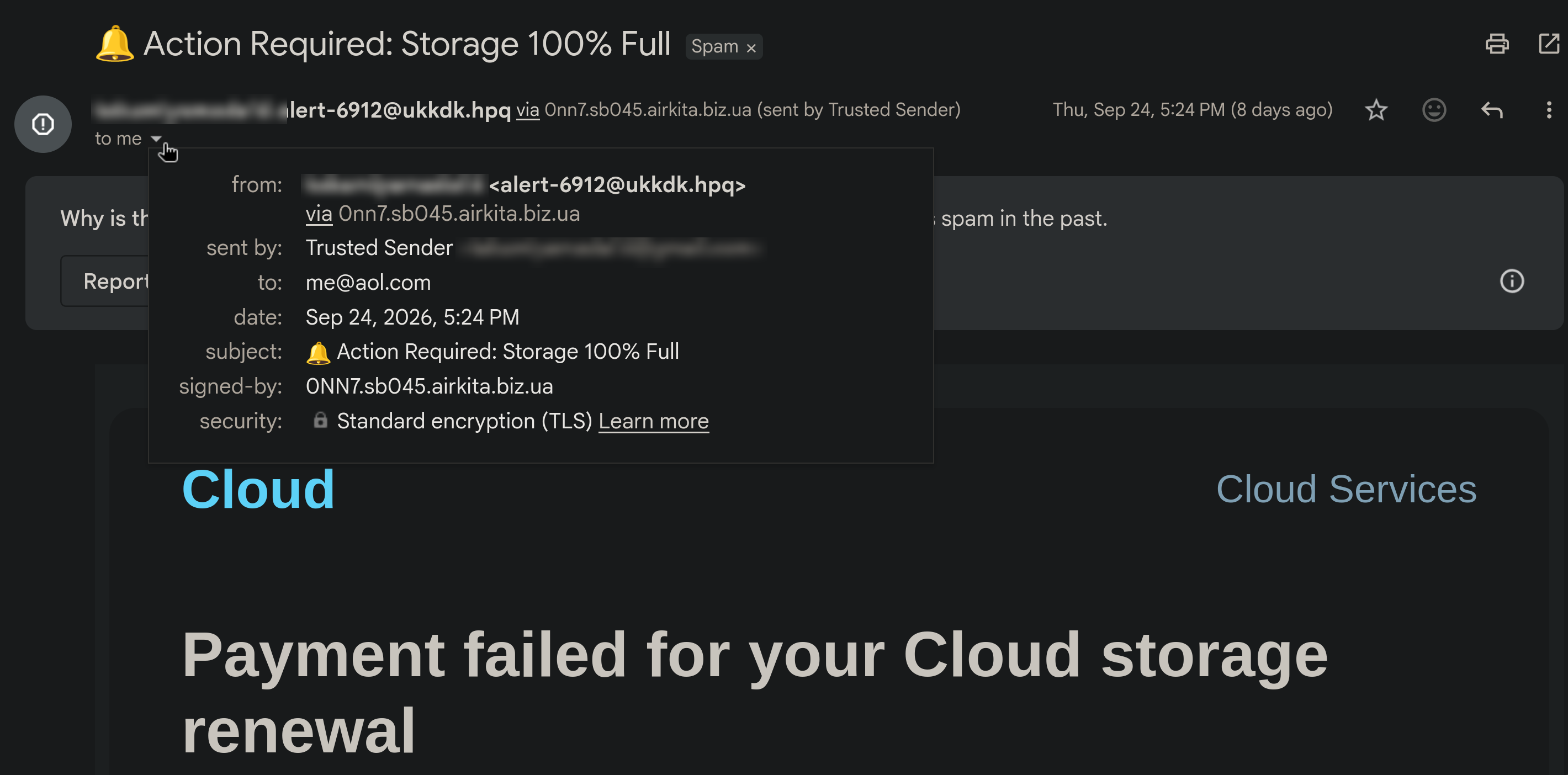
When you look past the sender's display name, the fake becomes obvious. An email app might show a familiar name, or even label it "Trusted Sender". But if you open the details of the sender, you can see where the message really came from: an unknown address sent through an unrelated foreign server (via airkita.biz.ua).
The second thing to check is the domain, the main part of the web address. paypal-security-alerts.com isn't paypal.com. Attackers use several kinds of fake domain, all designed to pass a quick look.
- Extra or swapped letters (typosquatting):
amazonn.cainstead ofamazon.ca, ornetfilx.cominstead ofnetflix.com. When you read quickly, your brain corrects the familiar shape and moves on. - "rn" instead of "m" (look-alike letters):
arnazon.caorrnicrosoft.com. In most screen fonts, anrfollowed by annlooks almost exactly like anm. - The subdomain trap:
amazon.ca.account-update.com. You readamazon.caat the start and assume the address is real. But the site you actually reach is the part just before the first slash:account-update.com. - Official-sounding words added (combosquatting):
paypal-security-alerts.com,appleid-verify.comormicrosoft-support.com. The extra words make it sound like a real department of the company. - Swapped characters:
paypa1.com, with the digit1instead of the letterl, ormicros0ft.com, with a zero instead of ano.
On a phone this is even harder. The address bar is tiny, long addresses are cut short, and a QR code picks the address for you without letting you check it first.
How to protect yourself. Never log in through a link that was sent to you. If your bank emails you, close the email, type the bank's address yourself or open its app, and look there.
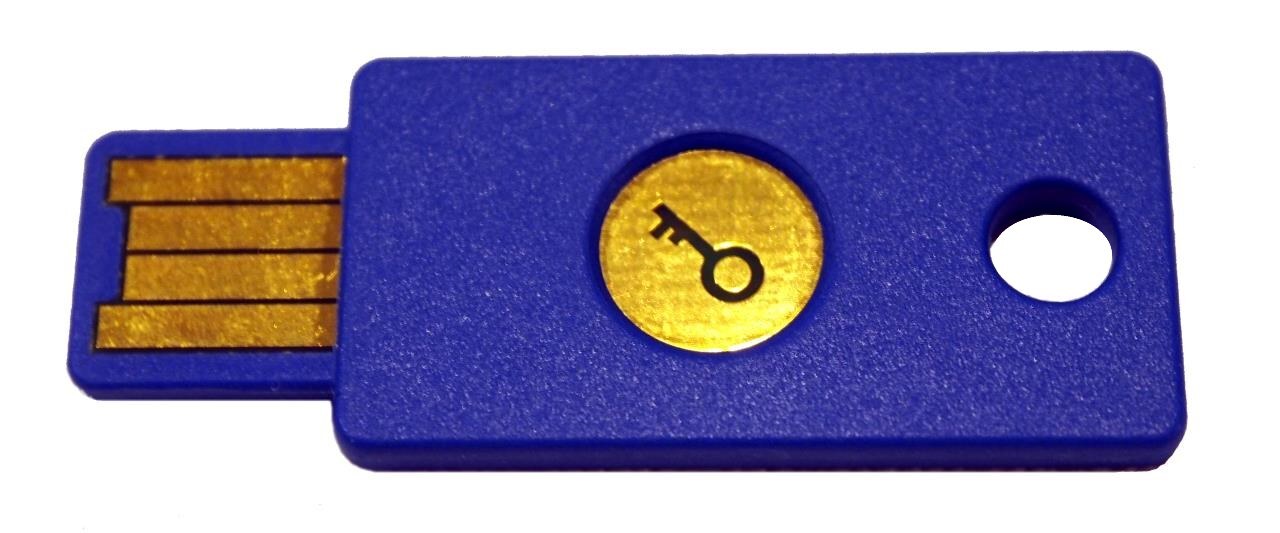
That one habit stops almost all phishing, however good the fake page is. The next step up is a passkey or a hardware security key. These check the real domain of the site before they log you in, so they can't be tricked by a fake site at all. The fake site never gets a valid answer, however convinced you are.
2. Credential stuffing: the breach you were not in
How it works. A site you signed up to in 2016 gets breached, which means attackers steal its data, and its list of emails and passwords ends up being passed around. Attackers take those millions of pairs and try them automatically on every other service: Gmail, Netflix, Steam, your bank. If you used the same password anywhere else, those accounts are taken too.
Nobody chose you. A script tried your login along with fifty million others, and the reused password let it in.
This is the attack behind most "my account got hacked" stories. The way in is usually a site the person joined years ago and has no reason to remember.
How to spot it. You usually can't, and that's the problem. The login works, and to the service it looks normal. Your early warnings are sign-in alerts you didn't cause, and password reset emails you didn't ask for. You can check haveibeenpwned.com to see which known breaches include your email address. For many of us, the answer is several.
How to protect yourself. Use a different password for every site. For a person, that means a password manager: you remember one strong passphrase, and it creates and stores all the others. Then a breach at one site stays at that site.
Then turn on two-factor authentication for the accounts that matter. With it, a stolen password isn't enough to log in. I think this is the most valuable hour you will ever spend on your own security.
Avoid text message codes whenever an authenticator is supported. SIM (Subscriber Identity Module) swaps, covered below, and redirected messages make text codes unsafe. Use an authenticator app, a hardware security key or a passkey instead.
| Method | Type | How it protects you |
|---|---|---|
 Google Authenticator | App (TOTP) | Free, offline 6-digit codes refreshed every 30 seconds. |
 Microsoft Authenticator | App (TOTP / Push) | One-tap number matching and offline time-based codes. |
 2FAS Authenticator | App (Open-Source) | Privacy-first TOTP with encrypted local or cloud backups. |
 Bitwarden | Vault / TOTP | Generates and autofills codes directly alongside saved credentials. |
 YubiKey | Hardware key (FIDO2) | Physical USB/NFC touch token immune to remote phishing. |
 Passkeys | Standard (WebAuthn) | Hardware-backed cryptographic keys unlocked via biometrics (Touch ID, Face ID, Windows Hello). |
TOTP (Time-based One-Time Password) is the six-digit code that changes every 30 seconds.
3. Malware: infostealers, trojans, and ransomware
How it works. Malware, harmful software, still has to get onto your computer, and it usually arrives looking like something you wanted. A free copy of paid software. A cheat for a game. A cracked licence. A fake browser update. An invoice attachment. Or an advert placed above the real result on a search page, which is called malvertising.
Today the malware is most often an infostealer. It takes every password saved in your browser, your cookies and your crypto wallets, uploads all of it within seconds, and often deletes itself afterwards. The cookies matter a lot. A cookie keeps you logged in, so a stolen cookie lets the attacker use your account without passing two-factor authentication again.
Ransomware is the more visible kind. It encrypts your files and asks for money to unlock them. People mostly meet infostealers, and companies mostly meet ransomware.
How to spot it. Before it happens, you are about to run an installer from a source you can't really trust, or a website insists that your browser is out of date and offers you a file to "fix" it. Afterwards, with a modern infostealer, there is often no sign at all. The most dangerous infection is the one with no symptoms.
How to protect yourself. Install software only from official sources: the maker's real website, your phone's or computer's app store, or your Linux package manager. Be careful with free copies of paid software. You usually pay with your data.
Let your operating system and browser update themselves, because a lot of malware uses security holes that were fixed months ago. Keep real backups, either offline or in a cloud service that keeps old versions, so that ransomware costs you some time instead of your files. And keep your passwords in a password manager rather than in the browser, because it's a smaller and better protected target.
4. Social engineering calls: the human exploit
How it works. Your phone rings. It's "Microsoft" calling about a virus, or your bank's fraud team about a strange payment, or the tax office about money you owe. The modern version is worse. It's the voice of someone in your family, copied by AI from thirty seconds of audio on social media, saying they are in trouble and need money now.
The attacker's real tool isn't technical. It's a state of mind with three parts: panic, authority and a deadline. Someone who is frightened, listening to an "official", and out of time doesn't check anything.
If a caller asks you to install a remote-control program so they can "fix" something, to read out a code you were just sent, or to pay with gift cards or crypto, it's a scam.
How to spot it. The caller creates the emergency, offers the solution, and insists on staying on the line while you do what they say. Real organizations don't do any of those three things. Nobody real is paid in gift cards. No bank asks you to move money to a "safe account". No support line calls you out of the blue about a virus.
How to protect yourself. There is one rule. Hang up, and call back on a number you looked up yourself: from your bank card, the official website, or your family member's real number.
This takes the phone line away from the attacker, and every one of these scams fails when you do it. It's also worth agreeing on a family code word for money emergencies. A copied voice can't know it.
5. SIM swapping: stealing your phone number
How it works. An attacker convinces your mobile phone company to move your phone number onto their SIM card. They might trick a support worker, pay someone inside the company, or know enough about you from earlier breaches to pass the identity check.
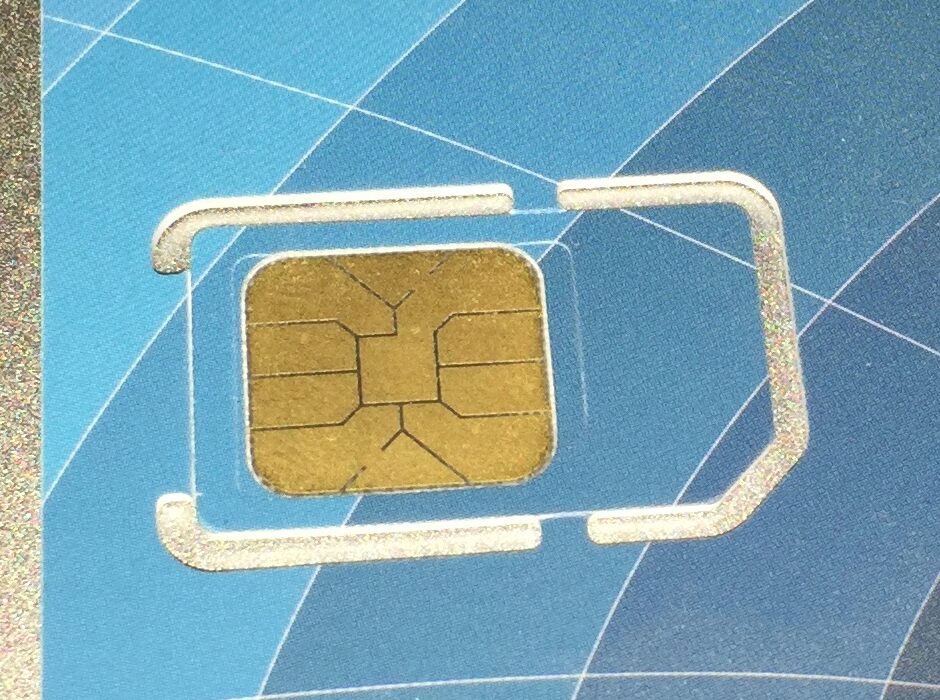
Your phone loses its signal. Theirs starts receiving your calls and, much more importantly, your text message codes and password reset texts. With your number, they reset your email password. With your email, they reset everything else.
This attack really is aimed at specific people, because it takes human effort for each victim. It mostly targets people who are known to own cryptocurrency or other valuable accounts.
How to spot it. Your phone suddenly shows "no service" somewhere it always has a signal, and it doesn't come back. Password reset messages start within minutes. You don't have long. If it happens, call your phone company from another phone straight away.
How to protect yourself. Ask your phone company for a port-out PIN or a number lock. Most companies offer one, and very few customers turn it on.
More importantly, stop using text messages as your second factor on accounts that matter. An authenticator app or a passkey lives on your device, not on your phone number, so a SIM swap can't touch it. Text codes are still better than no second factor, but they are the weakest kind, because of this attack.
6. Evil twin Wi-Fi: the coffee shop classic, mostly declawed
How it works. Anyone can create a Wi-Fi network called Airport_Free_WiFi, and your device will automatically join the strongest signal with a familiar name. The attacker's device then sits between you and the internet, and every packet you send passes through it.
Where this stands now. Fifteen years ago, this was very dangerous. Most of the web used plain HTTP (Hypertext Transfer Protocol), so your logins travelled through the air in readable form. Today almost every site uses HTTPS (Hypertext Transfer Protocol Secure), which is encrypted. Now an eavesdropper mostly learns which sites you visited, not what you did there.
Two real dangers are left. The first is a fake login page that appears when you join the network, asking you to "log in with Google". That's just phishing delivered locally. The second is a certificate warning: the large page saying "your connection is not private". It may really mean someone is reading your connection, and clicking past it is the one thing you must never do.
How to protect yourself. Take every certificate warning seriously. Never type real account passwords into a Wi-Fi login page. Turn off automatic joining for open networks. If you want one solution for all of this, a VPN encrypts all your traffic before it crosses the network you don't trust. Using your phone's hotspot instead is the other option.
The pattern under all of them
Put the attacks side by side, and a pattern appears.
| Attack | What it actually exploits |
|---|---|
| Phishing | Trust in a familiar looking sender, urgency |
| Credential stuffing | One password used in two places |
| Malware | Desire for free or cracked software, stale systems |
| Scam calls | Panic, deference to authority, deadlines |
| SIM swap | SMS as an identity anchor, carrier support desks |
| Evil twin | Auto-joining familiar network names |
Almost none of this is hacking in the technical sense. It's pretending to be someone else, reused passwords, and pressure. These attacks target habits, not encryption, and I think that's good news, because you can change your habits.
- Use a password manager, with a different password for every site. This stops credential stuffing completely.
- Turn on two-factor authentication with an app or a passkey, not text messages. This stops attacks with stolen passwords, and makes a SIM swap far less useful.
- Never log in through a link or a code that was sent to you. Go to the site yourself. This stops every kind of phishing.
- Hang up and call back on a number you found yourself. This stops every phone scam, including copied voices.
- Install from official sources, let things update themselves, and keep backups. This stops most malware and limits the damage from ransomware.
- When you feel rushed, treat the rush itself as the warning sign. Every attack above needs you to act quickly, so stopping to think is the defence.
My Take
While I was writing this post, I got my own "your parcel needs a customs payment" text. It came from a .top domain pretending to be the national post office, and it went straight into the spam folder.
These attacks aren't rare. They happen constantly, and everyone is targeted sooner or later. The security behind your accounts can be excellent, and it won't help if a convincing email, or five frightened minutes on the phone, gives the attacker a way in.
The six habits above take about an afternoon to set up, and they block most of what will realistically ever be aimed at you. If your family calls you for computer help, sending them that list is the cheapest security work you will ever do.
For what happens when the weak point is your gadgets rather than your habits, see Smart Homes Are a Security Nightmare. For how a VPN protects you on networks you don't trust, see How a VPN Actually Works.
Check yourself
3 questions · nothing is savedWho wrote this
Author profile and background

Takumi Yamada
· Backend EngineerBackend engineer building services, databases, Linux tooling, and NEGEN SYSTEMS. Writing about low-level mechanics, distributed systems, and real-world security.
- Written
- May 14, 2026
- Length
- 2,732 words · 12 min
- Built
- …
- Served by
- …
- Delivered
- …
- Over the wire
- …
- Go's share
- …
Smart Homes Are a Security Nightmare (If You're Not Careful)
Every smart bulb is a small computer on your network. Here's how these devices get taken over, and the checklist that keeps them contained.